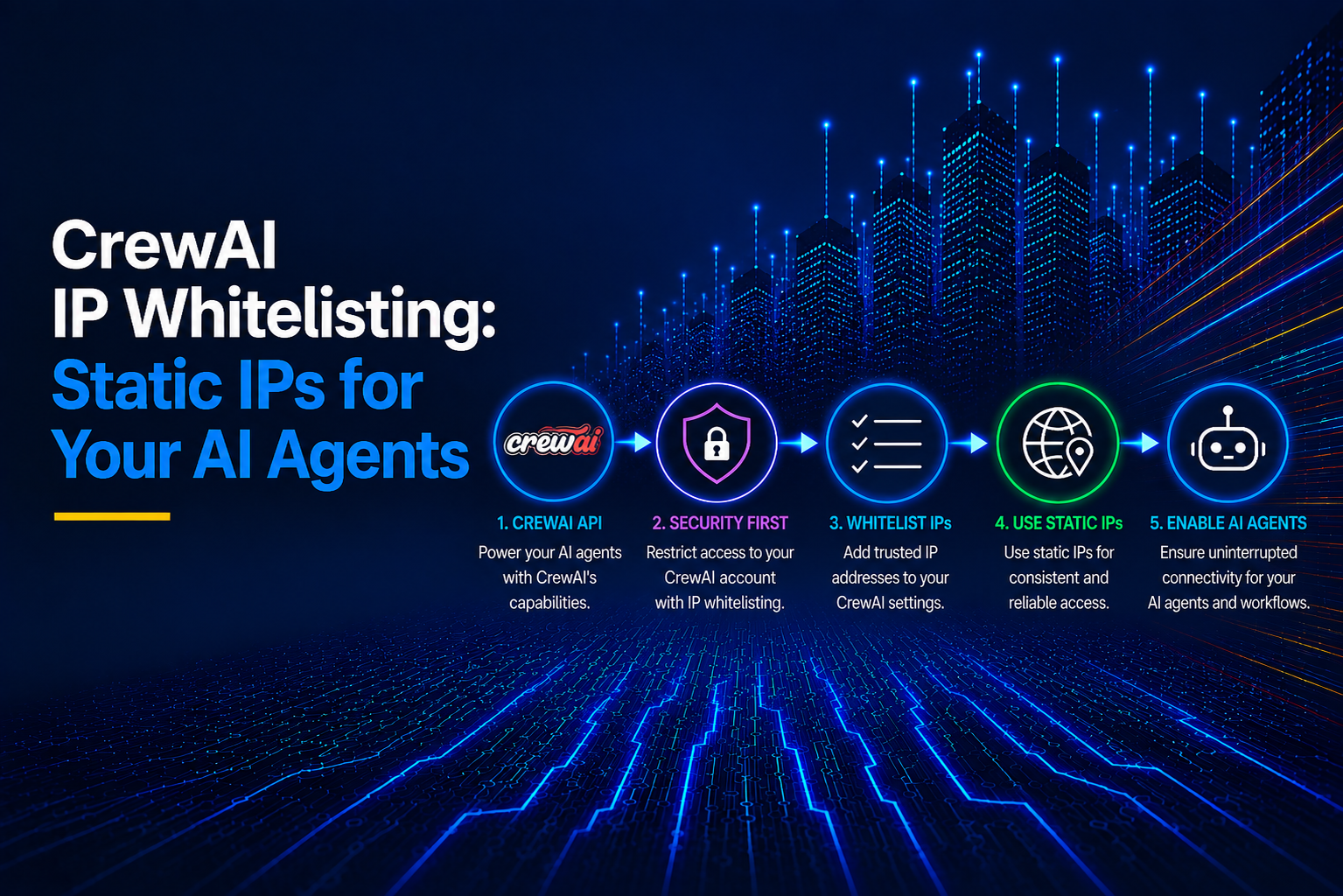
IP whitelisting for CrewAI fixes an authentication bug. Your crew runs cleanly on your laptop, but then one task in production returns a 403 Forbidden. You check the API key, and it is valid; however, the endpoint rejected the IP address your request came from.
A CrewAI agent picks its tools at runtime, so you cannot list every destination at build time. For example, your agent uses a custom tool to pull records from a Salesforce org that restricts API logins to set IP ranges. If a redeploy moves the crew to a new cloud IP, Salesforce rejects that one call, and the whole run fails with it.
This article shows how to assign your crew a fixed egress IP with OutboundGateway and scope it to the calls that need it.
Key Takeaways
- CrewAI has no IP allowlist for your agents. The restriction sits on the endpoints your tools call, so the IP problem is outbound.
- Setting
HTTPS_PROXYroutes all CrewAI traffic through the proxy, including LLM API calls and telemetry. To keep telemetry off your static IP, add its domain and port toNO_PROXY. - To route traffic through a proxy for a single tool, pass
proxies=directly to the requests call within a custom BaseTool, leaving the rest of the crew to make direct connections. - OutboundGateway provides a CrewAI process with two fixed EU IPs, either applied process-wide via a single environment variable or scoped to required tools.
Table of Contents
- What CrewAI Is and What It Does
- Running Your First CrewAI Crew
- What IP Whitelisting Means for CrewAI Agents
- Getting a Stable Egress IP for Your Cloud Environment
- Route CrewAI Traffic Through a Static EU IP with OutboundGateway
- Common CrewAI Proxy Errors and How to Fix Them
- Lock Your CrewAI Agents to an IP You Control
- Static IPs for CrewAI Frequently Asked Questions
What CrewAI Is and What It Does
CrewAI is an open-source Python framework that groups multiple agents, each with a role, a set of tools, and a task, into a runnable crew. In production, CrewAI offers a separate commercial platform called AMP (Agent Management Platform) that is not part of the open-source package.
When you deploy a crew to AMP, it exposes a REST API endpoint for that crew. It handles deployment by wrapping your crew in a REST API, giving you endpoints and webhook callbacks for task, step, and crew-level events.
Behind the scenes, a running crew does not send every request through one universal client. It reaches LLM providers through two separate paths:
- Native SDK integrations for OpenAI, Anthropic, Google Gemini, Azure OpenAI, and AWS Bedrock that connect directly to each provider's API with no translation layer.
- LiteLLM, which provides a fallback for providers that CrewAI does not natively support.
Where a running crew sends traffic
| Destination | Details | Needs a static IP? |
|---|---|---|
| Model provider | Native SDK calls (OpenAI, Anthropic, Gemini, Azure, Bedrock) or LiteLLM-routed calls (Ollama, Groq, Mistral, Cohere, etc.). | Not required by default. API key authentication is sufficient on its own. Whether you need a fixed, allowlisted IP depends on the provider. |
| Tool calls | The crew calls search services, external APIs, scraping targets, custom tools, or MCP servers. | Some external services require customers to add the runtime's public source IP to their allowlists. Local tools and private services may use different network controls. |
| Memory and embeddings backend | Vector databases like Pinecone or self-hosted pgvector. | Depends entirely on who hosts each service and how you control network access. |
| Telemetry | CrewAI's OpenTelemetry exporter posts to telemetry.crewai.com:4319 unless disabled. |
Does not generally require a dedicated static IP for telemetry, but the runtime may need outbound connectivity through its firewall, proxy, or egress gateway. |
Running Your First CrewAI Crew
- Install CrewAI and its tools package. CrewAI supports Python 3.10 to 3.13. It calls Gemini through Google's own SDK, so install the google-genai extra with the core package:
pip install "crewai[google-genai]" crewai-tools
- Set your LLM API key. You can create a free Gemini API key in Google AI Studio and store it in your environment. In Command Prompt on Windows:
set "GEMINI_API_KEY=your-gemini-key"
Keep the double quotes around the value. Without them, CMD stores the trailing space as part of the key.
- Turn off the trace prompt. When a crew finishes, CrewAI asks whether to share the execution trace and waits 20 seconds for an answer. Set this variable to skip it:
set "CREWAI_TRACING_ENABLED=false" (Use export on Mac or Linux instead of "set")
- Confirm the install:
crewai --version

crewai, version 1.15.22
Note. Ubuntu 24.04 rejects pip install outside a virtual environment with the error: externally-managed-environment. Create one with python3 -m venv .venv, then activate it with source .venv/bin/activate.
Building and running the crew
The sample task is for the crew agent to fetch live data from the GitHub API. Create a file named crew_demo.py and build it with the following steps:
- Import CrewAI, Pydantic, and requests:
import json

import os

from typing import Type

import requests

from crewai import LLM, Agent, Crew, Task

from crewai.tools import BaseTool

from pydantic import BaseModel, Field, HttpUrl
- Define the tool's input with Pydantic. The
HttpUrltype makes CrewAI reject a malformed URL from the agent before any request goes out:
class FetchInput(BaseModel):

    url: HttpUrl = Field(..., description="Full https:// URL of the JSON endpoint to fetch.")
- Build the HTTP tool on CrewAI's BaseTool.
args_schemaconnects the tool toFetchInput. The_runmethod sends the GET request and keeps the plain fields from the JSON response:
class HttpFetchTool(BaseTool):

    name: str = "http_fetch"

    description: str = "Sends a GET request to a URL and returns the status code and JSON body."

    args_schema: Type[BaseModel] = FetchInput

    def _run(self, url: str) -> str:

        response = requests.get(str(url), timeout=15)

        data = response.json()

        # Keep scalar fields only; GitHub's *_url links would bury the useful values

        body = {k: v for k, v in data.items() if not k.endswith("url") and not isinstance(v, (dict, list))}

        body["license"] = (data.get("license") or {}).get("spdx_id")

        return f"HTTP {response.status_code}\n{json.dumps(body)[:1500]}"
- Define the output models. RepoReport is the shape the task's final answer must match:
class RepoReport(BaseModel):

    full_name: str

    stars: int

    open_issues: int

    license: str

    default_branch: str

class EgressIP(BaseModel):

    ip: str
- Create the model client and the agent. The agent gets a role, a goal, a backstory, and the tool. Setting
temperature=0keeps its answers consistent between runs:
llm = LLM(model="gemini/gemini-3.6-flash", api_key=os.environ["GEMINI_API_KEY"], temperature=0)

researcher = Agent(

    role="API Researcher",

    goal="Fetch live data from public APIs and report it accurately",

    backstory="You call HTTP endpoints and report only the values they return.",

    tools=[HttpFetchTool()],

    llm=llm,

    verbose=True,

)
-
Create the task and the crew, then start the run.
output_pydantic=RepoReporttells CrewAI to validate the agent's final answer against the model.max_rpm=4caps the crew at four model calls per minute.The Gemini free tier allows five runs; without the cap, a second run within the same minute fails with
429 RESOURCE_EXHAUSTED. The free tier also allows 20 requests a day per model, which covers about six runs:
fetch_repo = Task(

    description="Fetch https://api.github.com/repos/crewAIInc/crewAI and report the repository's details.",

    expected_output="The repository's full name, star count, open issue count, license SPDX ID, and default branch.",

    output_pydantic=RepoReport,

    agent=researcher,

)

crew = Crew(agents=[researcher], tasks=[fetch_repo], max_rpm=4, verbose=True)

result = crew.kickoff()
- Print the typed result and your egress IP.
result.pydanticholds the validated RepoReport object. The last line prints the IP address your requests leave from:
print("\nStructured result:")

print(result.pydantic.model_dump_json(indent=2))

egress = EgressIP.model_validate_json(requests.get("https://outboundgateway.com/ip/", timeout=10).text)

print(f"\nEgress IP: {egress.ip}")
Here's the full script:
import json

import os

from typing import Type

import requests

from crewai import LLM, Agent, Crew, Task

from crewai.tools import BaseTool

from pydantic import BaseModel, Field, HttpUrl

class FetchInput(BaseModel):

    url: HttpUrl = Field(..., description="Full https:// URL of the JSON endpoint to fetch.")

class HttpFetchTool(BaseTool):

    name: str = "http_fetch"

    description: str = "Sends a GET request to a URL and returns the status code and JSON body."

    args_schema: Type[BaseModel] = FetchInput

    def _run(self, url: str) -> str:

        response = requests.get(str(url), timeout=15)

        data = response.json()

        # Keep scalar fields only; GitHub's *_url links would bury the useful values

        body = {k: v for k, v in data.items() if not k.endswith("url") and not isinstance(v, (dict, list))}

        body["license"] = (data.get("license") or {}).get("spdx_id")

        return f"HTTP {response.status_code}\n{json.dumps(body)[:1500]}"

class RepoReport(BaseModel):

    full_name: str

    stars: int

    open_issues: int

    license: str

    default_branch: str

class EgressIP(BaseModel):

    ip: str

llm = LLM(model="gemini/gemini-3.6-flash", api_key=os.environ["GEMINI_API_KEY"], temperature=0)

researcher = Agent(

    role="API Researcher",

    goal="Fetch live data from public APIs and report it accurately",

    backstory="You call HTTP endpoints and report only the values they return.",

    tools=[HttpFetchTool()],

    llm=llm,

    verbose=True,

)

fetch_repo = Task(

    description="Fetch https://api.github.com/repos/crewAIInc/crewAI and report the repository's details.",

    expected_output="The repository's full name, star count, open issue count, license SPDX ID, and default branch.",

    output_pydantic=RepoReport,

    agent=researcher,

)

crew = Crew(agents=[researcher], tasks=[fetch_repo], max_rpm=4, verbose=True)

result = crew.kickoff()

print("\nStructured result:")

print(result.pydantic.model_dump_json(indent=2))

egress = EgressIP.model_validate_json(requests.get("https://outboundgateway.com/ip/", timeout=10).text)

print(f"\nEgress IP: {egress.ip}")
Run with:
py crew_demo.py
Here's the output, trimmed to the main panels:
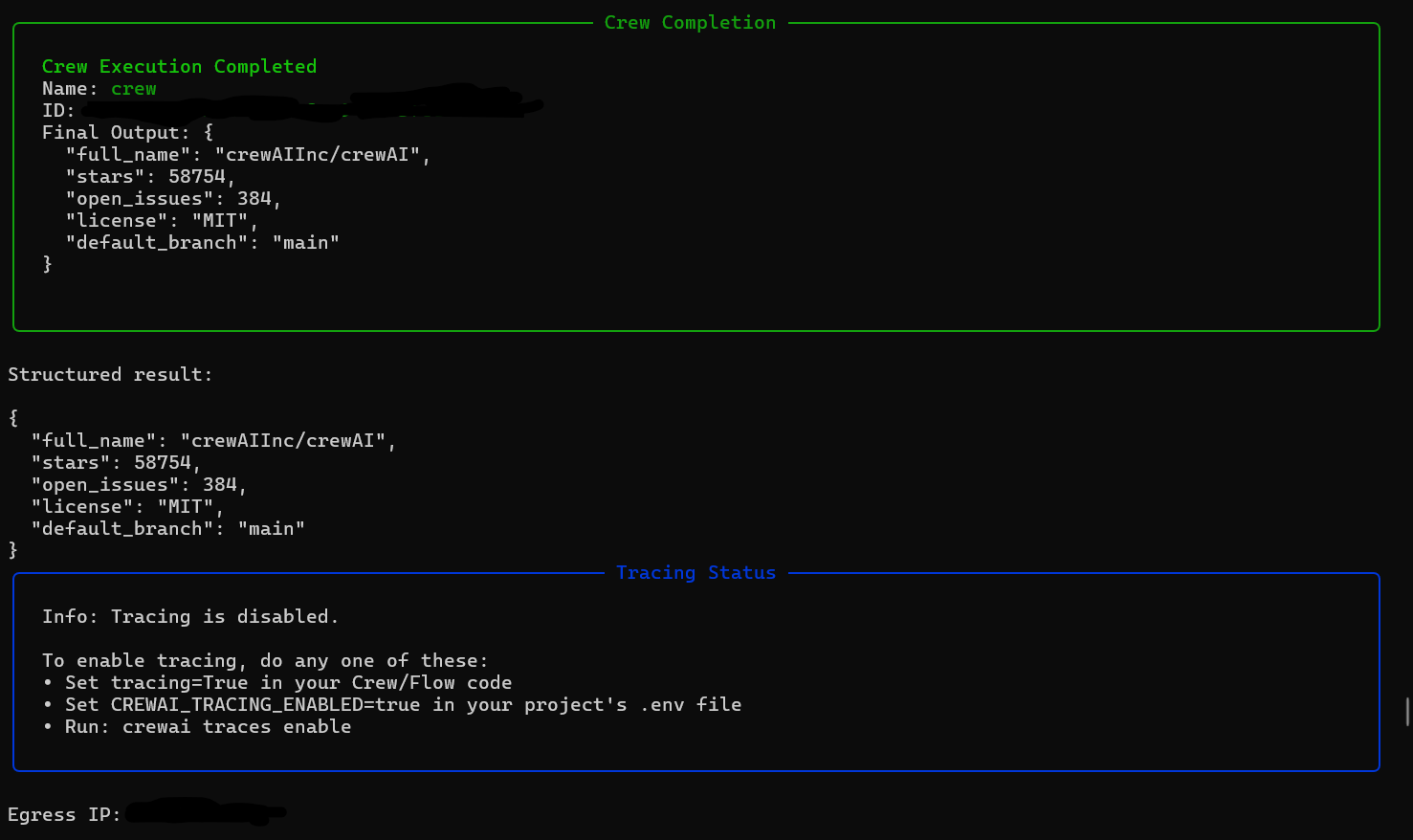
The last line is the address GitHub saw. Note that the IP was blurred out for safety reasons. On a cloud host, it comes from a shared pool that can change on the next redeploy. Take note of it. You will compare it with the proxied address later in this article.
What IP Whitelisting Means for CrewAI Agents
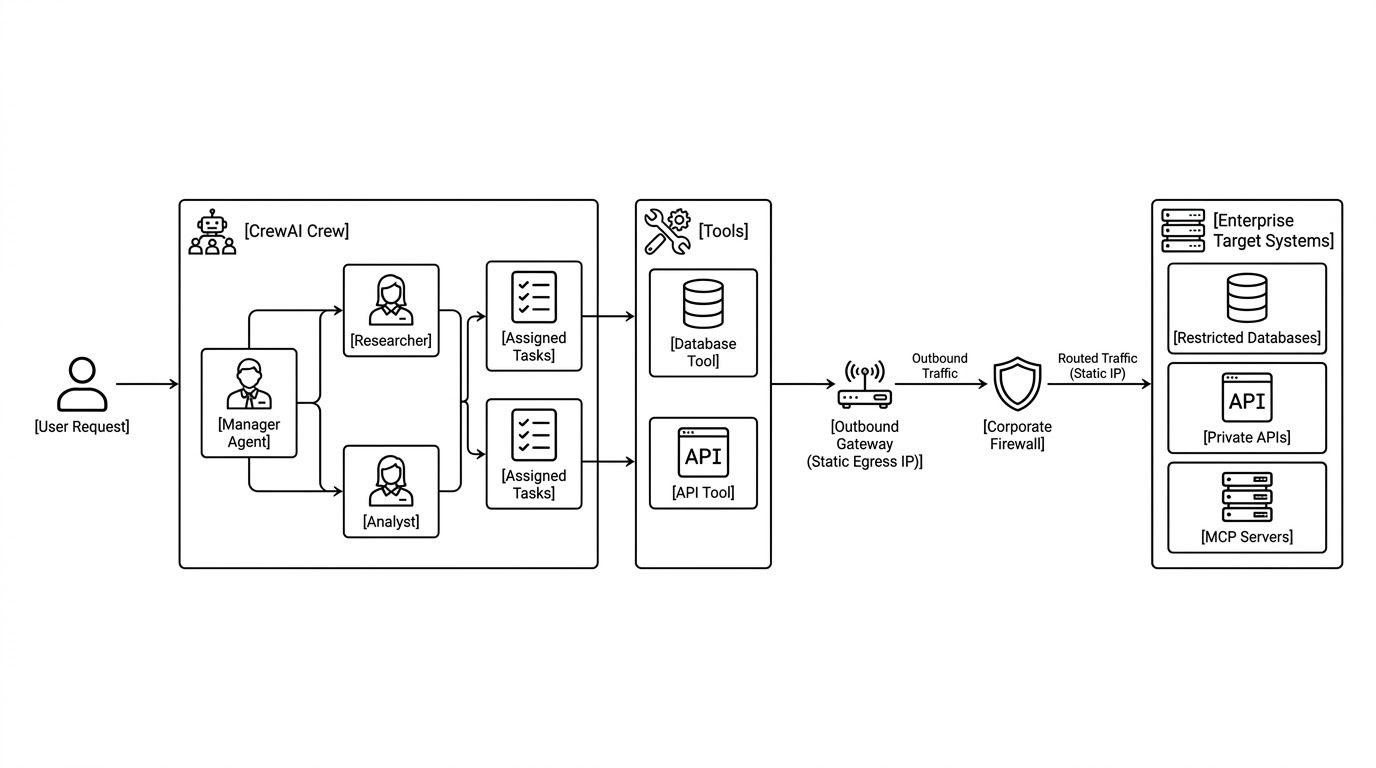
CrewAI does not provide an IP allowlist feature for your agents. The CrewAI GitHub App documentation addresses a different concern: adding your self-hosted server's IP to the IP allowlist that GitHub organization settings manage so CrewAI Factory can authenticate with GitHub, read repository contents, and receive deployment webhooks.
Where restrictions actually live
Restrictions exist at the external endpoints your tools call: an internal customer database, a private corporate API, a partner service, or a Model Context Protocol (MCP) server fronting an enterprise system. Those destination systems sit behind the firewalls or network policies that allow traffic only from approved IP addresses or private network ranges.
You may see connection failures at runtime rather than during deployment. When you deploy a crew, the container starts cleanly, dependencies resolve, and initial LLM calls succeed, since CrewAI routes them natively for supported providers or falls back to LiteLLM.
The failure happens when an agent autonomously chooses to invoke a specific tool. If the machine making that outbound request does not have an approved IP on the destination server, the destination rejects the request with 403 Forbidden or drops it silently, and the call times out, depending on whether the firewall responds or blackholes traffic.
The deployment succeeded, but the task failed because the agent selected a tool that was restricted.
Getting a Stable Egress IP for Your Cloud Environment
| Platform | Default outbound IP behavior | Why it changes | Static IP option exists natively? |
|---|---|---|---|
| AWS Lambda | Lambda does not provide a fixed public source IP for outbound internet calls. | AWS manages the underlying execution infrastructure and network path unless you configure VPC-based egress. | No, but you can attach a function to private subnets in a VPC plus a NAT Gateway, or configure a Lambda static IP with OutboundGateway. |
| CrewAI AMP | Does not guarantee a dedicated or static outbound IP. | The actual egress path depends on the AMP plan and CrewAI-managed network architecture. | Not by default; enterprise plans can add a dedicated VPC and NAT on AMP Cloud itself, or you can self-host via AMP Factory with a VPC NAT Gateway. |
| Kubernetes | The source IP depends on the node, cloud NAT, CNI, service mesh, and egress configuration. | Pods can move between nodes, and node-level or CNI-specific routing can expose different source addresses. | No, but you can achieve it by routing selected Pods through a cloud NAT Gateway with a reserved public IP, a CNI-supported egress-gateway or egress-IP feature, a service-mesh egress gateway, or dedicated egress nodes. |
| Railway | Railway provides static outbound IPs natively for Pro plan customers. | Railway can assign multiple static outbound IPs and distribute traffic among them for throughput and resilience. | Yes, for Pro plan customers at $20/month. However, note that the addresses are per-service and per-region, so the moment you add a second platform or need EU-resident egress, you are allowlisting a new set of addresses, which you avoid with OutboundGateway. Railway's enterprise prices are custom per user. |
| Render | Render services use outbound IP ranges that users can retrieve for the relevant service. | A service may use a set of outbound addresses rather than one dedicated IP. | Yes, native dedicated IPs are enabled for Pro plan users at $100/month, which is higher than OutboundGateway's €19 monthly plan. Workspaces that skip it still use shared regional ranges. |
| Docker on a cloud host | A container generally follows the host's or subnet's egress route. | The public IP can change if you (or your cloud provider) replace or recreate the host, or if the host picks up a new ephemeral address. It may remain stable across a reboot if the cloud provider retains the assigned address. | Assign a static public IP to the host where supported, or route the host or subnet through a NAT gateway or egress gateway with a reserved public IP. |
| Clever Cloud | Apps egress from shared regional ranges. | It can change these ranges at any time due to infrastructure expansion. | No dedicated static egress IP. Clever Cloud offers WireGuard, IPSec, and OpenVPN connectivity, quoted through support or sales. |
| Scalingo | Apps leave through a shared regional pool resolved by a regional hostname. | Scalingo states these IP ranges at any time but will give a 30-day notice. | No per-app static egress IP at any tier. The published addresses are shared by apps in the region, so allowlisting them implies you give other Scalingo users access. Scalingo's IPSec and OpenVPN addons route only traffic bound for your own private network and leave your public egress address unchanged. So for a public egress pair that belongs to your account, use OutboundGateway. |
If you run your own infrastructure and need a static egress IP, consider the following approaches:
- Routing container subnets through a dedicated VPC NAT Gateway
- Setting up a HAProxy on a small VPS attached to an elastic IP
- Using a dedicated outbound proxy service like OutboundGateway to pin a static egress address to your tool calls. It's the ideal approach because it delivers static IP allowlisting at the application layer instantly, avoiding the high cost and complexity of network re-architecting or maintaining custom proxy servers.
Route CrewAI Traffic Through a Static EU IP with OutboundGateway
OutboundGateway gives your crew two fixed EU IP addresses to add to an allowlist. First, get your proxy details with the following steps:
- Create an account on OutboundGateway. You get a 7-day free trial.
- Open "Proxy info" once your account is active. It shows your credentials and your two static IP addresses.
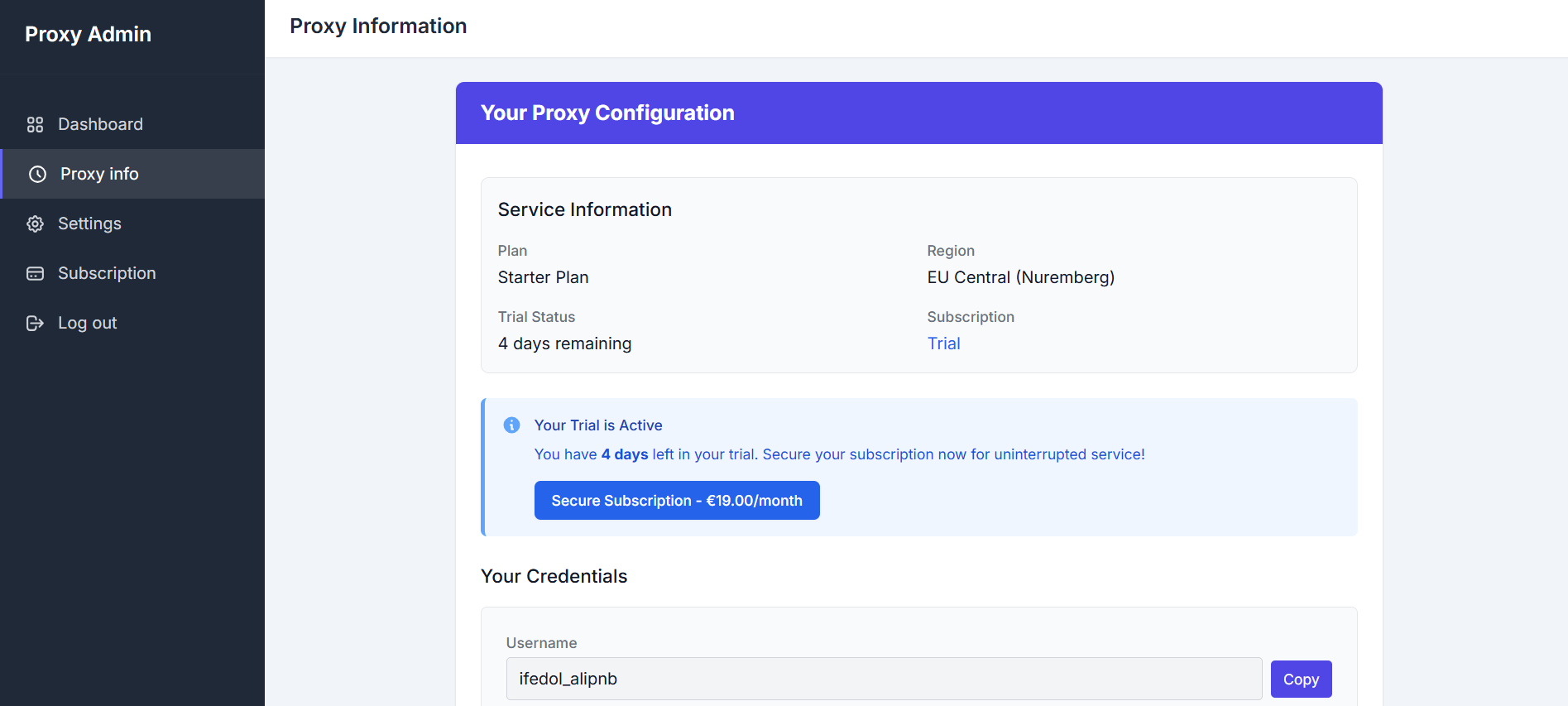
- Add both IP addresses to the allowlist on the endpoint your tool calls. Your traffic alternates between the two at random.
- Note the host and port for EU Central, and copy the username and password.
- Store the proxy as one URL. In Command Prompt on Windows:
set "OUTBOUND_PROXY=https://yourname:yourpassword@<your-proxy-host>:<your-proxy-port>"
Replace yourname, yourpassword, <your-proxy-host>, and <your-port> with the values from "Proxy info". On macOS and Linux, use export HTTPS_PROXY="https://...".
Point CrewAI at the static egress proxy
Make a copy of crew_demo.py from "Running Your First CrewAI Crew", name it crew_proxy.py, and make the following changes:
- Read the proxy URL from the environment. Add this line below the imports:
PROXIES = {"https": os.environ["OUTBOUND_PROXY"]}
- Send the tool's request through the proxy. In
HttpFetchTool._run, passproxies=PROXIEStorequests.get, and raise the timeout to 30 seconds to allow for the extra network hop. This is the only request in the crew that uses the static IP:
 def _run(self, url: str) -> str:

        response = requests.get(str(url), proxies=PROXIES, timeout=30)

        data = response.json()

        # Keep scalar fields only; GitHub's *_url links would bury the useful values

        body = {k: v for k, v in data.items() if not k.endswith("url") and not isinstance(v, (dict, list))}

        body["license"] = (data.get("license") or {}).get("spdx_id")

        return f"HTTP {response.status_code}\n{json.dumps(body)[:1500]}"
- Print your egress IP with and without the proxy. Add this helper and the two print lines after the EgressIP model, so both addresses appear before the crew starts:
def egress_ip(proxies: dict | None = None) -> str:

    response = requests.get("https://outboundgateway.com/ip/", proxies=proxies, timeout=30)

    return EgressIP.model_validate_json(response.text).ip

print(f"Egress IP without the proxy: {egress_ip()}")

print(f"Egress IP with the proxy:    {egress_ip(PROXIES)}\n")
The model client, agent, task, and crew stay the same.
Here's the full script:
import json

import os

from typing import Type

import requests

from crewai import LLM, Agent, Crew, Task

from crewai.tools import BaseTool

from pydantic import BaseModel, Field, HttpUrl

PROXIES = {"https": os.environ["OUTBOUND_PROXY"]}

class FetchInput(BaseModel):

    url: HttpUrl = Field(..., description="Full https:// URL of the JSON endpoint to fetch.")

class HttpFetchTool(BaseTool):

    name: str = "http_fetch"

    description: str = "Sends a GET request to a URL and returns the status code and JSON body."

    args_schema: Type[BaseModel] = FetchInput

    def _run(self, url: str) -> str:

        response = requests.get(str(url), proxies=PROXIES, timeout=30)

        data = response.json()

        # Keep scalar fields only; GitHub's *_url links would bury the useful values

        body = {k: v for k, v in data.items() if not k.endswith("url") and not isinstance(v, (dict, list))}

        body["license"] = (data.get("license") or {}).get("spdx_id")

        return f"HTTP {response.status_code}\n{json.dumps(body)[:1500]}"

class RepoReport(BaseModel):

    full_name: str

    stars: int

    open_issues: int

    license: str

    default_branch: str

class EgressIP(BaseModel):

    ip: str

def egress_ip(proxies: dict | None = None) -> str:

    response = requests.get("https://outboundgateway.com/ip/", proxies=proxies, timeout=30)

    return EgressIP.model_validate_json(response.text).ip

print(f"Egress IP without the proxy: {egress_ip()}")

print(f"Egress IP with the proxy:    {egress_ip(PROXIES)}\n")

llm = LLM(model="gemini/gemini-3.6-flash", api_key=os.environ["GEMINI_API_KEY"], temperature=0)

researcher = Agent(

    role="API Researcher",

    goal="Fetch live data from public APIs and report it accurately",

    backstory="You call HTTP endpoints and report only the values they return.",

    tools=[HttpFetchTool()],

    llm=llm,

    verbose=True,

)

fetch_repo = Task(

    description="Fetch https://api.github.com/repos/crewAIInc/crewAI and report the repository's details.",

    expected_output="The repository's full name, star count, open issue count, license SPDX ID, and default branch.",

    output_pydantic=RepoReport,

    agent=researcher,

)

crew = Crew(agents=[researcher], tasks=[fetch_repo], max_rpm=4, verbose=True)

result = crew.kickoff()

print("\nStructured result:")

print(result.pydantic.model_dump_json(indent=2))
Run with:
py crew_proxy.py
Here's the output, trimmed to the main panels:
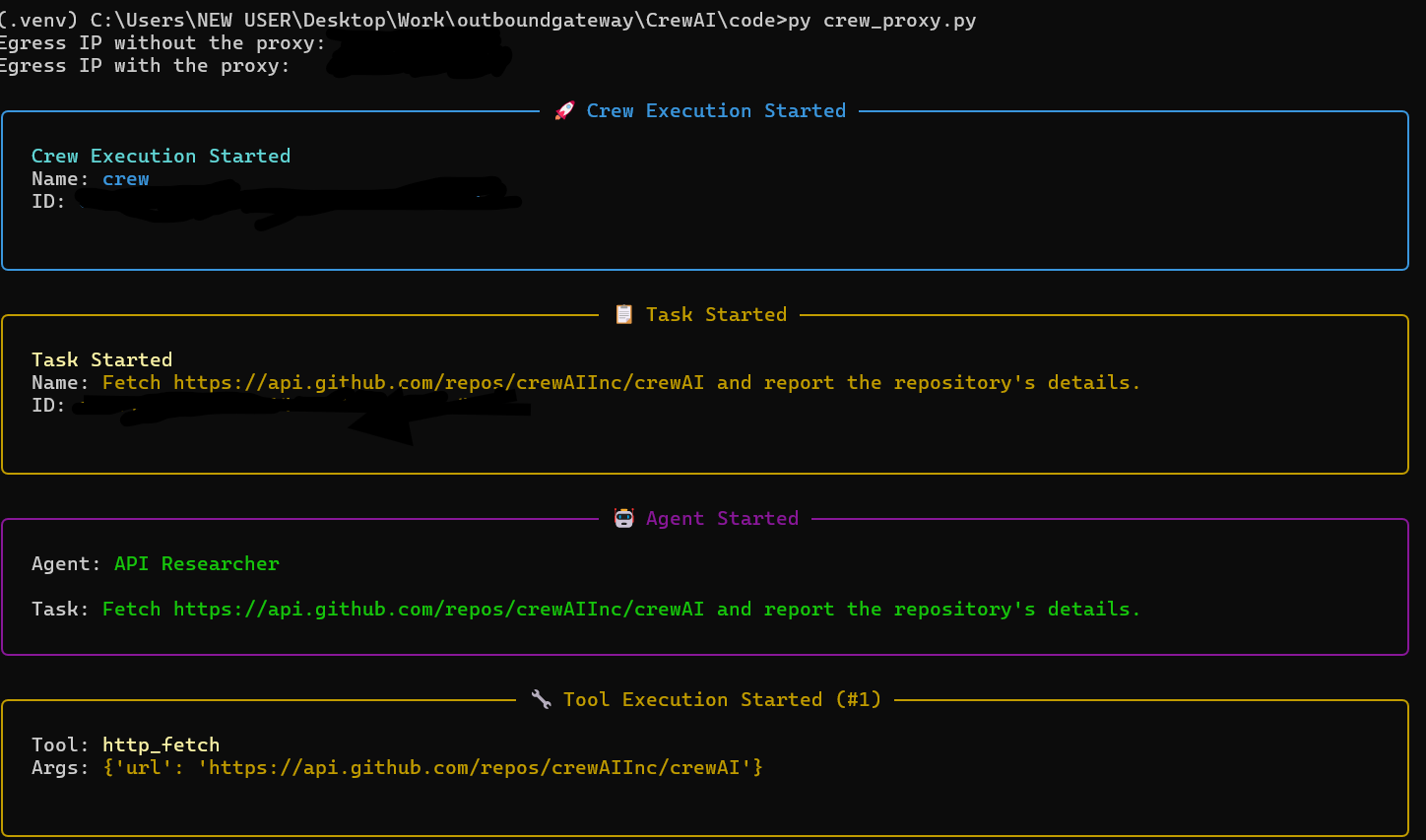
The output shows two different addresses at the start. Note that they were blurred out for safety reasons. The first comes from your ISP or cloud host, while the second is one of your OutboundGateway IPs.
Alternative: proxy the whole process. You can set HTTPS_PROXY to the same URL and run crew_demo.py with no code changes.
The difference is scope: every request in the process then goes through the static IP, including the model call and telemetry, so you need a NO_PROXY list such as localhost,127.0.0.1,telemetry.crewai.com,generativelanguage.googleapis.com to send the rest directly.
Common CrewAI Proxy Errors and How to Fix Them
If a crew begins timing out or raising network and TLS errors after you introduce a proxy, use the table below as a starting point.
| Symptom | What is actually happening | Fix |
|---|---|---|
| The run hangs or times out while exporting CrewAI or OpenTelemetry telemetry. | The telemetry exporter may be using the proxy, the proxy may reject the connection, or a corporate firewall may block the configured telemetry endpoint or transport. | Check the exporter endpoint, protocol, proxy policy, and firewall logs. If the endpoint should bypass the proxy, add the verified hostname to the NO_PROXY list. To disable CrewAI telemetry, set CREWAI_DISABLE_TELEMETRY=true. Set OTEL_SDK_DISABLED=true only if you intend to disable all OpenTelemetry instrumentation in the process, as it affects any OpenTelemetry-based tracing, not just CrewAI. |
| CERTIFICATE_VERIFY_FAILED: unable to get local issuer certificate appears. | The Python HTTP client cannot build a trusted certificate chain. Possible causes include a missing or outdated Certificate Authority (CA) bundle, an incomplete server chain, a hostname mismatch, or a TLS-inspecting proxy whose private root certificate the client does not trust. | Identify the HTTP client that made the failing request. Install the organization's approved root CA where required, or configure the client with the correct CA bundle. Requests commonly supports REQUESTS_CA_BUNDLE; some Python/OpenSSL-based clients support SSL_CERT_FILE. Do not set certificate verification to false as a routine production fix. |
| An MCP tool over HTTPS fails when routed through a TLS-inspecting proxy. | The configured MCPServerHTTP interface may not expose a per-server verify or custom SSL-context parameter in the installed CrewAI version. The Python process may also lack the proxy's root certificate authority (CA). | Install the approved root CA in the relevant trust store or configure the HTTP client with the appropriate CA bundle before starting the process. |
| The observed public egress IP does not change after you set proxy variables. | The Python process may not have received the variables, NO_PROXY may bypass the target, or the failing client may not honor the variables. Different tools may also use different HTTP clients or transports. |
Inspect HTTP_PROXY, HTTPS_PROXY, ALL_PROXY, and NO_PROXY from the same Python process that runs the crew. Confirm the proxy supports the relevant protocol and that the target is not bypassing it. Do not print proxy credentials when logging configuration. |
| Some requests succeed while others fail. | The deployment may use multiple proxy egress addresses, NAT gateways, worker nodes, IPv4/IPv6 paths, or proxy-pool members. Different tools may also bypass the proxy or use different routes. | Identify the source IP that the destination sees for each failing service. Ask the network or proxy administrator for the complete egress range, then allowlist that range where appropriate. Use a controlled egress gateway if the destination requires a stable source IP. |
| The egress IP differs between a shell test and a CrewAI run. | The shell and Python process may use different environment variables, proxy settings, DNS paths, containers, or parent processes. A child process normally inherits its parent's environment, but IDEs, notebooks, service managers, and containers can change the effective environment. | Test from the same Python process and runtime that executes the failing tool. Use an organization-approved diagnostic endpoint, set a timeout, and remove the diagnostic code after testing. |
Lock Your CrewAI Agents to an IP You Control
Pin the calls that need a fixed identity to a static IP, and let the rest of your crew connect directly. Your allowlist stays short, and you only proxy the traffic that needs it.
OutboundGateway provides your crew with two fixed EU IPs via a single environment variable, with no changes to your crew code. Start a 7-day trial and add both addresses to the necessary allowlists.
Built with ❤️ for EU businesses who care about privacy and sovereignty.
Static IPs for CrewAI Frequently Asked Questions
Does CrewAI support IP whitelisting?
CrewAI does not provide a general IP-allowlisting control for an agent's outbound traffic. However, the self-hosted CrewAI Platform Helm chart supports ingress-level restrictions. For NGINX ingress, configure the appropriate whitelistSourceRange. The chart also supports custom annotations for ingress controllers that provide their own access-control features.
Why does my CrewAI agent return a 403 when my API key is valid?
A 403 with a valid key usually means the endpoint allowlists source IPs, and your request left from an address outside the list. Less often, your cloud host shares an egress range the service has flagged. To tell which, print the egress IP from inside the running crew process with requests.get("https://outboundgateway.com/ip/") and compare it with the allowlist.
Can I route only some CrewAI tools through the static IP?
Yes, with a per-tool proxy. Store the proxy URL in its own variable and pass it as proxies= to requests inside a custom BaseTool. Only that tool's calls use the static IP, while the model call and telemetry leave from your host. If you set HTTPS_PROXY process-wide, list the hosts to skip in NO_PROXY. Scoped routing is the recommended setup.